
eBook > The JMeter Playbook: Build, Scale, and Optimize Performance Tests
Thread Groups
A Thread Group is the starting point of every test plan. It tells JMeter how many virtual users to create, how fast to start them, and how long or how many times they will run.
Back to topAdding a Thread Group
Right-click the Test Plan node → Add → Threads (Users) → Thread Group.
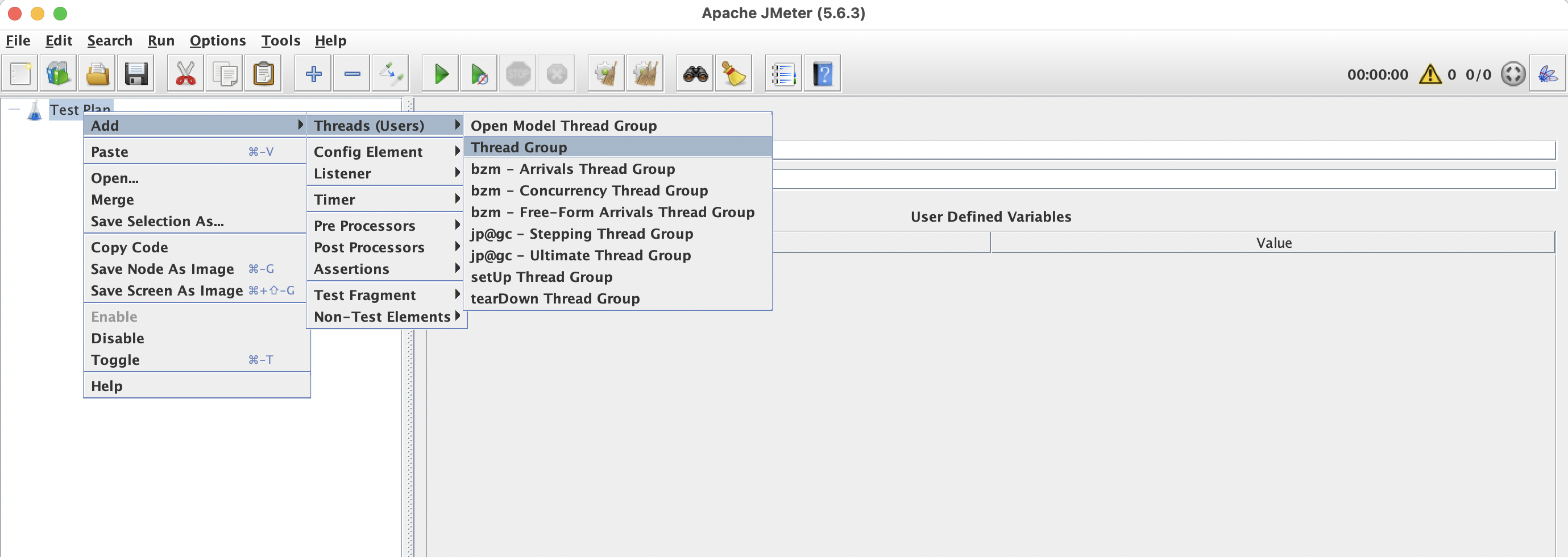
Back to top📸 Screenshot: Adding a Thread Group via the context menu.
Configuration Options
| Setting | Description | Typical Value |
|---|---|---|
| Number of Threads (users) | How many virtual users will be started | 100 – 1000 |
| Ramp-Up Period (seconds) | Time to start all threads. E.g., 100 threads with a 50 s ramp-up = 2 new threads/second | 30 – 120 |
| Loop Count | How many times each thread repeats the test logic. Use -1 with a Duration for timed tests | 1 or -1 |
| Same user on each iteration | Switches between “new user” and “returning user”, same user means same cookie, cache, etc. | ✅ |
| Duration (seconds) | How long Thread Group will be running. Make sure to provide enough loops | 300 – 3600 |
| Startup delay (seconds) | Wait before this thread group starts | 0 |
Example: 50 Users, 1 minute ramp-up, 5 minute run
Number of Threads : 50
Ramp-Up Period    : 60
Loop Count        : Infinite (-1)
Duration          : 300
This means JMeter will add roughly one new user every 1.2 seconds (60 ÷ 50) until all 50 are active, then keep running for 5 minutes.
Back to topRamp-Up Explained
The ramp-up period prevents all threads from hitting the server simultaneously at test start. A gradual ramp-up:
- Lets the server warm up (JIT compilation, connection pools).
- Produces more realistic load curves.
- Makes it easier to spot the concurrency level where performance degrades.
- Gives you the possibility to correlate increasing load with other test metrics like response time, throughput, number of errors, etc.
Users ▲
  50  │                  ┌──────────────────
      │                 /
      │               /
      │             /
      │           /
      │         /
      │       /
      │     /
   0  └───/──────────────────────────────▶ Time
      0   60s                           360s
          ← ramp-up →  ← steady state →
Special Thread Groups
JMeter comes with two additional thread group types:
setUp Thread Group
Runs before all regular thread groups. Normally it’s being used for test initialization and creating pre-requisites:
- Authenticate and store the token into a JMeter property for later re-use
- Create test data in the database
tearDown Thread Group
Runs after all regular thread groups finish. Use it for cleanup. Well-behaved tests leave the system under test in the same state as just before the test run. Use tearDown Thread Group to i.e.:
- Delete test data created during the run.
- Send test completion notification.
Back to topFrom JMeter Plugins: Stepping Thread Group and Ultimate Thread Group (provided by the Custom Thread Groups plug-in) give you much more control when it comes to creating ramp-up/ramp-down phases, plateau, spikes, etc. Additionally, they plot chart with the load pattern so you will be able to visualize it
Best Practices
- Start small - begin with 1 thread to verify your test logic, then scale up.
- Use ramp-up - a zero-second ramp-up is almost never realistic.
- Prefer Duration over Loop Count for load tests - it makes scheduling predictable and you will have confidence that test ends in specific time
- Name your Thread Groups descriptively, e.g., “Browse Products” or “Checkout Flow."
Summary
- A Thread Group defines the number of virtual users, ramp-up, and duration.
- Use
setUpandtearDownThread Groups for pre/post test actions. - Ramp up gradually.
- Before running a full-scale test, run it with 1-2 users/iterations to ensure that the test is doing what it’s supposed to be doing.
Now let’s learn about Samplers.