
eBook > The JMeter Playbook: Build, Scale, and Optimize Performance Tests
Samplers
A Sampler is the element that actually sends a request to the system under test and waits for the response. JMeter includes samplers for many protocols out of the box; the most commonly used is the HTTP Request sampler.
In this exercise we’ll do the following:
- Simulate opening of https://demoblaze.com website
- Simulate click on
Samsung galaxy s6 - Simulate click on
Add to cartbutton
HTTP Request Sampler
There are several ways of configuring HTTP Request samplers in JMeter. Some users record their scripts using browser and JMeter’s HTTP(S) Test Script Recorder, some prefer BlazeMeter Chrome Extension, and some of them write HTTP requests manually using sniffer or browser developer tools or looking into API specification.
We’ll go “manual” way to get a better understanding of how the HTTP Request sampler works under the hood and what each setting means.
Right-click your Thread Group → Add → Sampler → HTTP Request.
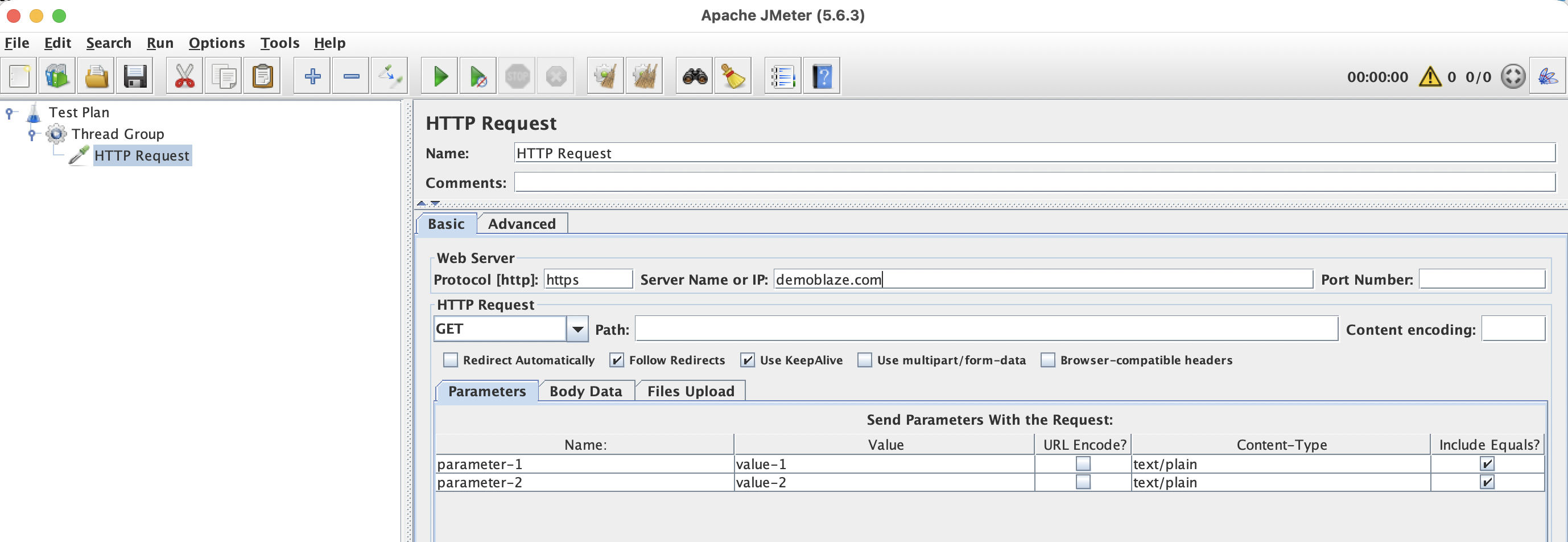
📸 Screenshot: HTTP Request sampler configuration panel.
Key Fields
| Field | Description | Example |
|---|---|---|
| Protocol | http or https or file (for reading local files) | https |
| Server Name or IP | Target hostname (no protocol prefix) | demoblaze.com |
| Port Number | Leave blank for default (80/443) | |
| Method | HTTP request method | GET, POST, PUT, DELETE |
| Path | URL path | /cart.html |
| Content encoding | Character set | UTF-8 |
| Parameters or Body Data | Request body for POST/PUT (switch to the Body Data tab) | {"title":"test"} |
| Files Upload | Upload files with POST or PUT request | /path/to/file.txt |
First GET Request
Protocol         : https
Server Name      : demoblaze.com
Method           : GET
Path             : /
Now let’s simulate the one which reads the list of products from the website backend API:
Second GET Request
Protocol         : https
Server Name      : api.demoblaze.com
Method           : GET
Path             : /entries
And another one to open Samsung galaxy s6 product details page:
Third GET request
Protocol         : https
Server Name      : demoblaze.com
Method           : GET
Path             : /prod.html?idp_=1
This sends GET https://blazedemo.com/prod.html and stores the response internally
POST Request
Protocol         : https
Server Name      : api.demoblaze.com
Method           : POST
Path             : /addtocart
Body Data        : {"id":"2b8c07a1-3f99-9fce-9c55-65ebc2a17565","cookie":"user=c9ebe5ff-8354-749d-f3f8-73e07c67f29b","prod_id":1,"flag":false}
You will also need to add an HTTP Header Manager as a child of this POST request to set Content-Type: application/json.
HTTP Header Manager
Right-click a sampler → Add → Config Element → HTTP Header Manager.
Add a row:
| Name | Value |
|---|---|
Content-Type | application/json |
When placed as a child of a sampler, the header applies only to that request. When placed at the Thread Group level, all HTTP requests inherit the headers. For headers like Content-Type: application/json that only apply to POST/PUT requests, place the Header Manager under the specific sampler.
HTTP Cookie Manager
Many web applications use cookies for session management. Add an HTTP Cookie Manager at the Thread Group level:
- Right-click Thread Group → Add → Config Element → HTTP Cookie Manager.
Leave the defaults. JMeter will automatically store and resend cookies to simulate a real browser. If you need to add or modify cookies manually, you can do it using HTTP Cookie Manager.
Back to topHTTP Request Defaults
If every request in your test targets the same server, avoid repeating the protocol, hostname, and port on each sampler. Instead, add an HTTP Request Defaults config element at the Thread Group or Test Plan level:
Protocol    : https
Server Name : demoblaze.com
Individual HTTP Request samplers only need to specify the Method and Path. Empty fields will be populated from the HTTP Request Defaults. It is possible to override individual fields separately if needed.
Real modern browsers download embedded resources (images, scripts, styles, fonts, sounds) and do it in parallel opening up to 6 connections per domain. To simulate this behavior, check the Retrieve All Embedded Resources option in your HTTP Request Defaults and set Parallel Downloads. Number to 6.
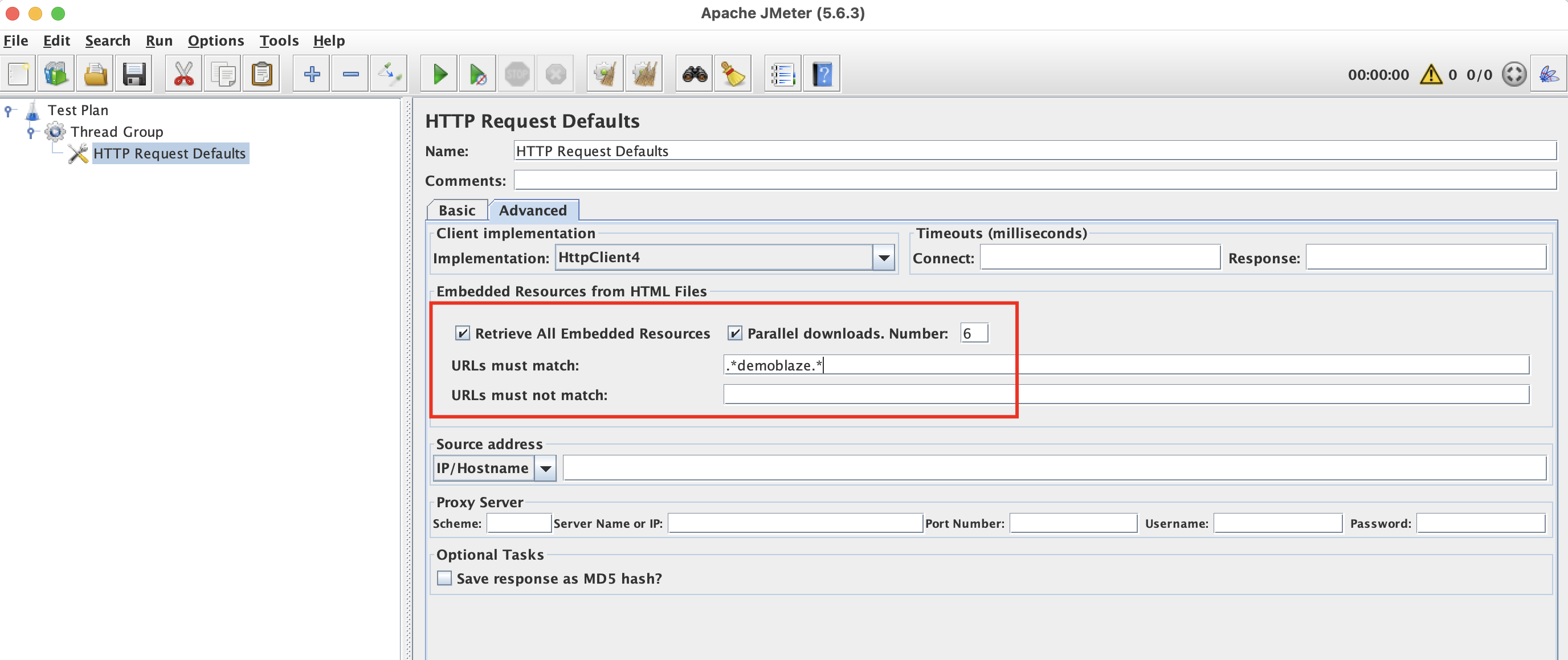
Back to top📸 Screenshot: HTTP Request Defaults Embedded Resources.
HTTP Cache Manager
Real browsers cache static resources to save bandwidth and speed up page loads. There are special HTTP Headers which tell the browser whether it should download the new version of the resource or if it can be returned from cache. To simulate this behavior, add HTTP Cache Manager to your Test Plan.
Back to topOther Useful Samplers
| Sampler | Use Case |
|---|---|
| JDBC Request | Execute SQL queries against a database |
| JSR223 Sampler | Run Groovy/JavaScript/Python code |
| JMS Publisher / Subscriber | Test message queues (ActiveMQ, RabbitMQ via JMS) |
| Flow Control Action | Can be used for controlling test flow, i.e. conditionally starting new iteration or stopping the virtual user in case of error |
| Debug Sampler | Display all variables (and properties if you choose to do so) to the response - very helpful for debugging |
Back to topTip: The Debug Sampler is your best friend when in comes to test debugging and seeing variable values. Add one temporarily to see everything JMeter knows at that point in the test.
Putting It Together: A Minimal Test Plan
At this point your test plan tree should look like:
Test Plan
└── Thread Group  (1 thread, 1 loop)
    ├── HTTP Request Defaults   (protocol: https, server: demoblaze.com)
    ├── HTTP Cookie Manager
    ├── HTTP Cache Manager
    ├── GET /                   (HTTP Request sampler - open homepage)
    ├── GET /entries            (HTTP Request sampler - list products, server: api.demoblaze.com)
    ├── GET /prod.html?idp_=1   (HTTP Request sampler - product details)
    └── POST /addtocart         (HTTP Request sampler - add to cart, server: api.demoblaze.com)
        └── HTTP Header Manager (Content-Type: application/json)
Click the green ▶ Start button to run the test. You won’t see results yet. For that, we need Listeners (next section).
Summary
- The HTTP Request sampler is the main element for web applications performance testing.
- Use HTTP Request Defaults to avoid duplicating server details and other settings like embedded resources handling.
- Add an HTTP Header Manager for custom headers and a Cookie Manager for session tracking.
- If you’re testing a web application enable fetching embedded resources and add HTTP Cache Manager to represent browser cache.
- The Debug Sampler is essential for seeing variables and properties values when it comes to test troubleshooting.