
eBook > The JMeter Playbook: Build, Scale, and Optimize Performance Tests
Assertions
Assertions check the actual server’s response against anticipated values. If an assertion fails, JMeter marks the Sampler as failed, which increases the Error % in your reports.
Back to topResponse Assertion
The most commonly used and flexible assertion. Right-click a sampler → Add → Assertions → Response Assertion.
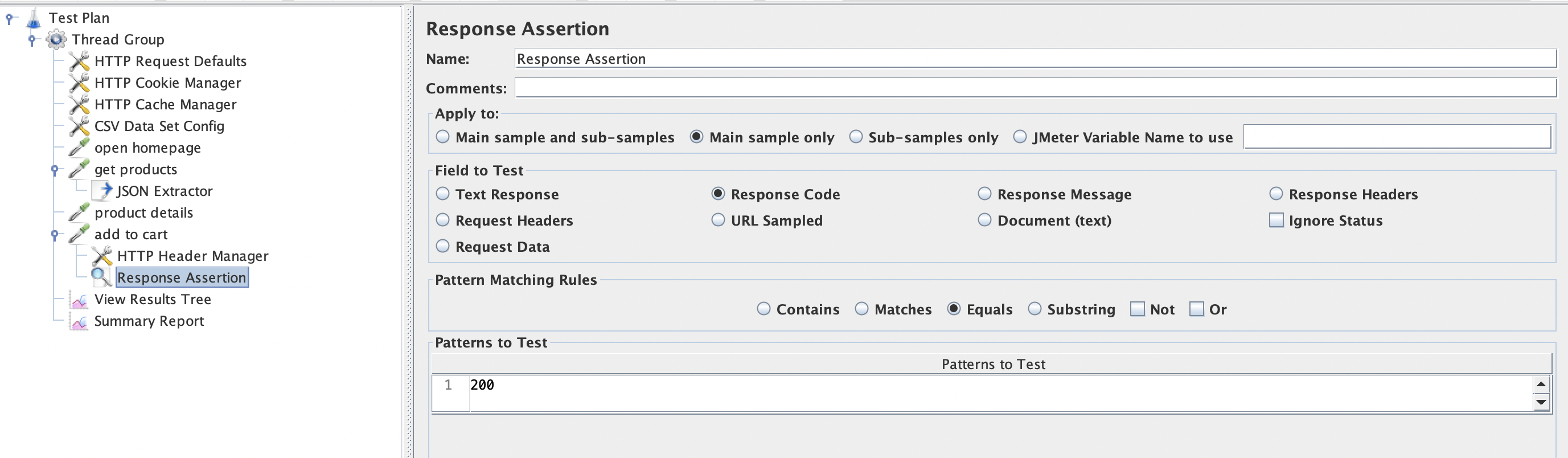
📸 Screenshot: Response Assertion configuration.
Configuration
| Field | Description |
|---|---|
| Apply to | Main sample, sub-samples, or both |
| Field to Test | Response Body, Response Code, Response Headers, or Request Data |
| Pattern Matching Rules | Contains, Matches (full regex), Equals, Substring, Not/Or logical operators |
| Patterns to Test | One or more strings or regex patterns |
Example: Verify Status Code 200
Field to Test           : Response Code
Pattern Matching Rules  : Equals
Patterns to Test        : 200
Example: Verify Response Body Contains a Key
Field to Test           : Response Body (Text)
Pattern Matching Rules  : Substring
Patterns to Test        : "galaxy"
Example: Verify Response Does NOT Contain an Error
Field to Test           : Response Body (Text)
Pattern Matching Rules  : NOT Contains
Patterns to Test        : "error"
JSON Assertion
Purpose-built for JSON responses. Right-click a sampler → Add → Assertions → JSON Assertion.
| Field | Value |
|---|---|
| Assert JSON Path exists | $.userId |
| Expected Value | 42 |
| Match as regular expression | false |
This asserts that the JSON response has a field userId with value 42.
Example: Assert Array Is Not Empty
Assert JSON Path exists : $.posts
Additionally assert value : (unchecked)
Check “Expect null” = false and “Invert assertion” = false. This simply asserts that the posts key exists.
Duration Assertion
Fails the sampler if the response takes longer than a threshold.
Duration in milliseconds : 2000
Any response slower than 2 seconds will be flagged as a failure. This is useful for SLA validation.
Back to topTip: By default, JMeter will wait for a response forever. So, if the system under test is overloaded and won’t respond, the Duration Assertion will never fire. Make sure to set reasonable connect and response timeouts, better in HTTP Request Defaults.
Size Assertion
Validates the response size (in bytes). Useful for detecting truncated or unexpectedly large responses.
Size in bytes : 1048576
Type of comparison : < (less than)
Assertion Scope
Like all JMeter elements, assertions follow JMeter Scoping Rules:
| Placement | Effect |
|---|---|
| Child of a sampler | Applies only to that sampler |
| Same level as samplers (under Thread Group) | Applies to every sampler in the group |
| Under the Test Plan | Applies to every sampler in the entire test |
Back to topTip: Place a generic
Response Code = 200assertion at the Thread Group level to catch unexpected errors on every request. Add sampler-specific assertions as children for body validation.
Viewing Assertion Failures
Assertion failures are visible in:
- View Results Tree - failed samplers are shown in red with the assertion failure message in the Assertion Results tab.
- Aggregate Report / Summary Report - the Error % column reflects Samplers failures including the ones caused by failed Assertions.
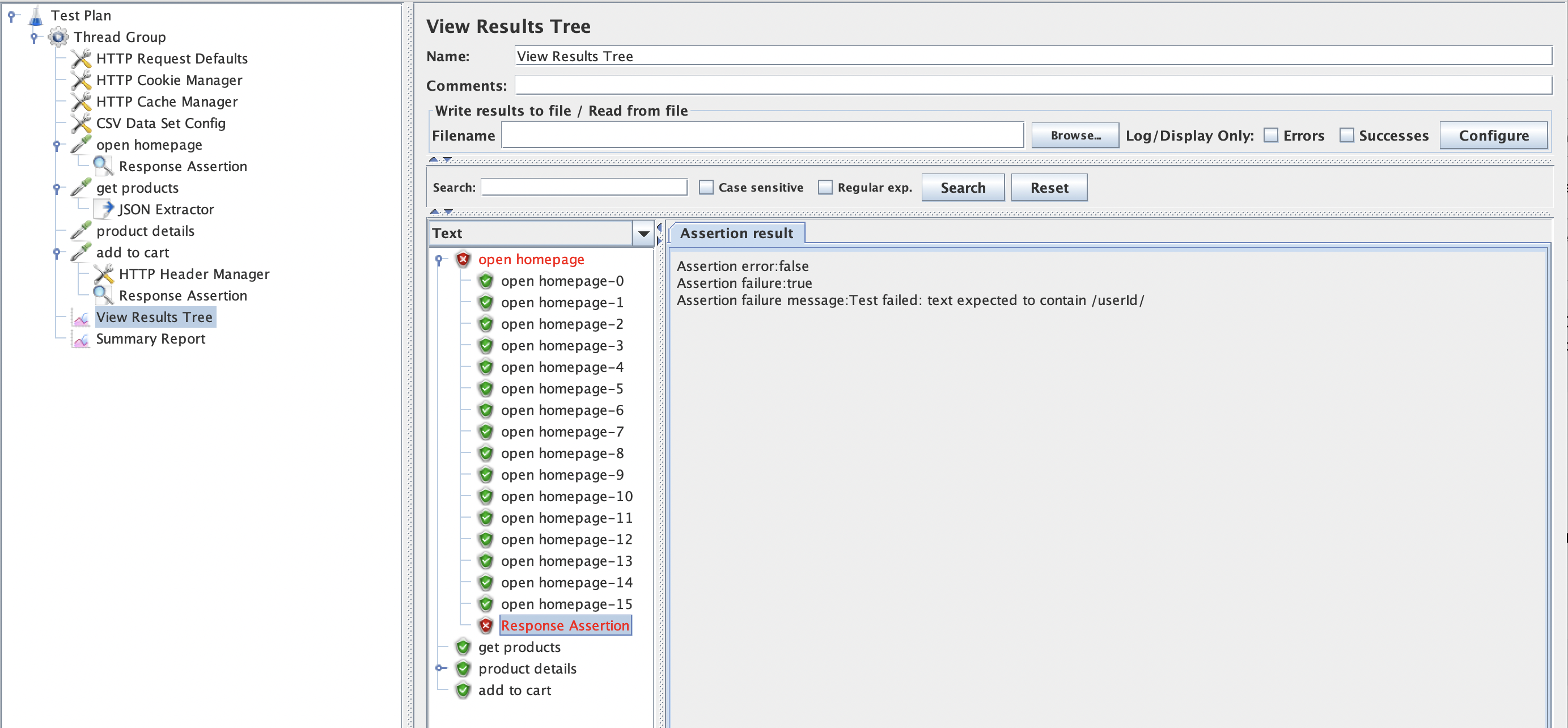
Back to top📸 Screenshot: Assertion failure shown in View Results Tree.
Best Practices
- Always add at least one assertion. A load test without assertions cannot detect functional errors under load.
- Don’t add too many Assertions. Assertions have their cost and can consume load generator resources if overused.
- Keep assertions lightweight. Complex regex patterns executed thousands of times per second consume CPU.
- Use JSON Assertion for JSON APIs. It is faster, less fragile and more readable than regular expressions.
- Add a Duration Assertion to enforce SLA thresholds automatically.
- Check Error % in reports. A sudden spike in errors usually means the server is returning unexpected content.
Summary
- Response Assertion - flexible text/regex checking on any response field.
- JSON Assertion - validates JSON structure and values via JSONPath.
- Duration Assertion - enforces response-time SLAs.
- Place assertions strategically using JMeter Scoping Rules to avoid duplicate elements and ensure that Assertion checks right Sampler result.
- Always inspect assertion failures in View Results Tree when debugging.
Not let’s get familiarized with Logic Controllers which allow us to control the flow of our test execution.