
You record a user flow, replay it in JMeter, and the test fails with 401 and 403 errors. Nothing flagged a problem before the run started.
That's often a missed correlation. Correlation is the process of finding dynamic values in server responses, such as session IDs and CSRF tokens, and passing them into later requests in your test script. Done by hand, it can take hours, even for experienced testers.
Perforce BlazeMeter's AI Auto Correlation automates this step. Simply upload a HAR file (a browser recording of network traffic). The feature then detects the dynamic values, maps how they connect across requests and responses, and generates a ready-to-use JMeter script. This blog explains why manual JMeter correlation is so slow and how automated correlation in JMeter works in BlazeMeter.
Back to top
What Is JMeter Correlation, and Why Does It Break Tests?
JMeter correlation connects the dynamic values a web application generates to the requests that need them later. Modern applications create new values for every session, such as session IDs, authentication tokens, CSRF tokens, and any dynamic data sent by the application that is specific to the user. A recorded script holds the old values, and the server rejects them when the test replays.
Correlation fixes this with two pieces:
- Extractor: Captures a dynamic value from a server response.
- Injection: Places that value into each later request that needs it.
Testers find each value by hand, write the extractor, and wire the injection into every request that uses it. In a very dynamic application, that work adds up fast. Miss one value, and the failure stays hidden until runtime. A missed correlation shows up as a 401 or 403 error in the middle of a test, which makes the root cause hard to find. A quick recording turns into a debugging project.
Back to topWhy Manual JMeter Correlation Slows Teams Down
Manual JMeter correlation slows teams down in three ways:
- It takes hours. Finding values, writing extractors, and wiring injections by hand can take hours, even for experienced testers.
- It sets a high technical bar. Correlation calls for deep JMeter expertise, sometimes experience with the application itself, and testers without it often stall at this step and stop scripting altogether.
- Errors stay silent until runtime. A missed correlation shows up as a 401 or 403 error mid-test, so teams lose time tracing the cause.
These problems grow with the application. A complex user flow with many requests, each passing values to the next, leaves plenty of places to miss one.
Guide
Make JMeter work smarter with AI.
Discover practical ways to cut repetitive work, accelerate test creation and analysis, and build more efficient performance testing workflows. Get the Performance Engineer’s Guide to JMeter and AI and start putting AI to work.
How Automated Correlation in JMeter Works with BlazeMeter
BlazeMeter AI Auto Correlation handles automated correlation in JMeter from a single HAR file. The AI analyzes the recording and finds the dynamic values. It then maps each value to the requests that need it and generates a correlated JMeter script.
You'll need a HAR file, which is a browser recording of your user flow. Then follow these steps:
Go to Performance in BlazeMeter and click Create Test.
Upload your HAR file.
Click Proceed in the pop-up, or open the Auto Correlation tab.
Wait for the initial analysis to finish, which takes about a minute depending on the size of the HAR file.
Review the results in the Correlation Dashboard, which opens automatically.
Inside the Correlation Dashboard
The BlazeMeter Correlation Dashboard makes JMeter correlation visual and guided. A three-panel editor lists every request with its correlation status. You can see which requests have extractors and injections and which ones need attention. To create an extractor, select a value directly in the request or response. A Correlation Health score tracks the overall quality of your test as you work.
Before you generate the final JMX file, run a Dry Run. It tests the full correlation model, so errors surface before any load runs instead of mid-test. When the health score and the Dry Run look good, finalize the script to generate the JMX.
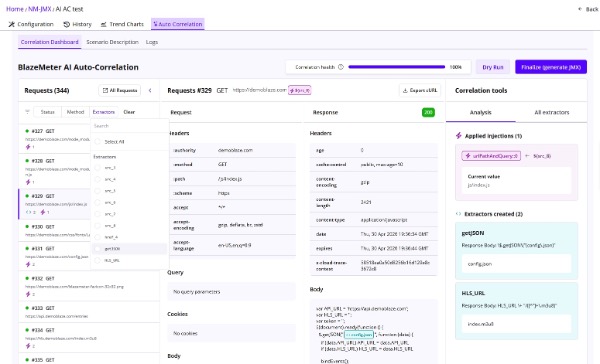
Here’s how BlazeMeter AI Auto Correlation compares with manual JMeter correlation:
Task | Manual JMeter Correlation | BlazeMeter AI Auto Correlation |
Find dynamic values | Search requests and responses by hand | AI analyzes the HAR file and detects dynamic values |
Map extractors to injections | Write each extractor and wire each injection manually | AI maps the relationships and generates a correlated JMeter script |
Spot missed correlations | Failures appear as 401 or 403 errors mid-test | The editor flags problematic requests upfront |
Validate before load | Discover problems during the load test | Dry Run checks the full correlation model before any load runs |
Skill needed | Deep JMeter expertise | The dashboard and health score guide less experienced users |
Where JMeter Auto Correlation Pays Off
JMeter auto correlation helps most for performance engineers and QA teams at enterprises that run JMeter-based load tests on complex, session-heavy web applications. Three use cases stand out:
New test scripting: Cut hours from creating a JMeter script for a new application flow.
Test maintenance: When an app changes and existing correlations break, re-analyze the updated HAR file instead of hunting down what changed by hand.
Scaling the team: Less experienced testers can produce correctly correlated scripts without senior JMeter expertise on hand.
The feature fits several industries:
Financial services and banking: Apps with CSRF tokens, session management, and strict authentication flows leave no room for a missed correlation.
E-commerce and retail: Dynamic checkout and cart flows carry heavy session state that breaks without proper correlation.
SaaS and enterprise software: Teams that run continuous performance testing in CI/CD need to script new flows quickly and repeatedly.
Speed Up JMeter Correlation with Perforce BlazeMeter
Perforce BlazeMeter is a continuous testing platform for performance, functional, and API testing, with service virtualization and test data built in. Teams run JMeter, Gatling, K6, and other open source frameworks natively. AI Auto Correlation turns a HAR file into a ready-to-run JMeter script.
Automate Correlation with AI
Upload a HAR file, and AI Auto Correlation detects dynamic values, maps extractors to injections, and generates the JMeter script.
Catch Errors Before the Load Test
The Correlation Health score and Dry Run flag problem requests before any load runs.
Stay on Open Source JMeter
AI Auto Correlation generates a JMeter script, so your team keeps working in the open source framework they already know.
Experience BlazeMeter AI Auto Correlation Firsthand
See how AI Auto Correlation turns a HAR file into a validated JMeter script.
Back to top
Frequently Asked Questions About JMeter Correlation
What Is correlation in JMeter?
Correlation in JMeter captures dynamic values from server responses, such as session IDs and CSRF tokens. It then passes them into later requests. An extractor captures each value, and an injection places it where it's needed. Without correlation, a replayed script sends stale values and the server rejects them.
What is a HAR file?
A HAR file is a browser recording of network traffic. It captures the requests and responses from a user flow. BlazeMeter AI Auto Correlation takes a HAR file as input and analyzes it to find the dynamic values in that flow.
How does BlazeMeter AI Auto Correlation work?
You upload a HAR file when you create a test in BlazeMeter. The AI detects dynamic values across requests and responses and maps how they connect. Then it generates a correlated JMeter script. The Correlation Dashboard opens after an initial analysis of about a minute.
What does Dry Run do?
Dry Run tests the full correlation model before BlazeMeter generates the final JMX file. It catches errors early, so you find problems before a load test starts instead of seeing 401 or 403 errors mid-test.
Do you need deep JMeter expertise to use AI Auto Correlation?
No. The Correlation Dashboard and Correlation Health score guide the process visually, so less experienced testers can produce a working test. Experienced testers can also create extractors directly in the editor.
What happens when the application changes?
When an app changes and correlations break, re-analyze the updated HAR file in BlazeMeter. You don't need to hunt down what changed by hand.