
Blog
June 25, 2026
How to Recover and Upgrade Istio to Newer Versions with Private Registry Configuration

Performance Testing
Service mesh technology has become a critical infrastructure for modern applications, but legacy deployments often carry operational and security risks. If you're running Istio in a BlazeMeter enterprise environment (especially one handling sensitive performance test data) upgrading to a stable, current version with private registry support is not just a best practice; it's a security and compliance necessity.
This guide walks you through a proven recovery and upgrade path from legacy Istio (1.26.0 & before) to a stable, production-ready release (1.29.0+), with a security-first focus on private registry integration for air-gapped or restricted-network environments.
Back to topPart 1: WHY — The Business and Security Case
Why Upgrade to a Newer Istio Version?
- Security Patch Coverage
- Legacy Istio versions (1.13.x) have reached end-of-support. CVE fixes are no longer backported.
- Newer versions (1.29.0+) receive regular security updates and are supported for 18+ months.
- Blazemeter customers handling sensitive performance data and compliance requirements (PCI-DSS, SOC 2, etc.) cannot run unsupported versions in production.
- Kubernetes API Compatibility
- Kubernetes regularly deprecates and removes APIs (e.g.,
policy/v1beta1for PodSecurityPolicy). - Legacy Istio may fail on modern Kubernetes clusters (1.25+).
- Newer Istio versions are tested against current Kubernetes releases, preventing unexpected failures during cluster upgrades.
- Stability and Performance
- Version 1.29.0 addresses injection template bugs, networking issues, and sidecar reliability.
- Better resource utilisation and reduced CPU/memory footprint for the control plane.
- Improved resilience for multi-zone and hybrid deployments common in Blazemeter's enterprise customer base.
- Operational Consistency
- Unified Istio versions across all components eliminate "version skew" errors and mysterious injection failures.
- Easier troubleshooting and vendor support when all components align to a known release.
Why Use a Private Registry?
- Air-Gapped and Restricted Network Compliance
- Many Blazemeter enterprise customers operate in restricted networks (firewalls, proxies) without direct internet access to public container registries.
- Pulling images from private registries ensures compliance with network segmentation policies.
- Image Scanning and Supply Chain Security
- Private registries enable upstream vulnerability scanning before images enter production.
- Compliance with SBOM (Software Bill of Materials) and image provenance requirements.
- Reduced attack surface by avoiding dependency on external registries that may be compromised.
- Performance and Reliability
- Local registry pulls are faster, reducing startup times for pods and sidecars.
- No external dependency means improved reliability during cluster scaling events or pod evictions.
- Bandwidth savings in multi-cluster or edge deployments.
- Cost Control
- Avoid egress charges associated with pulling from public registries.
- Predictable, metered consumption of registry bandwidth within your organisation.
Part 2: BACKUP — Protect Your Current Installation
Before upgrading anything, capture a complete baseline of your current Istio setup. This is your safety net.
Step 1: Backup Existing Istio Resources
Backup the entire istio-system namespace.
kubectl -n istio-system get all,cm,secret,sa,role,rolebinding -o yaml \ > istio-system-backup-$(date +%Y%m%d-%H%M%S).yaml
Backup Helm release history (critical for rollback).
helm -n istio-system list helm get values istiod -n istio-system > istiod-values-backup.yaml helm get manifest istiod -n istio-system > istiod-manifest-backup.yaml
Capture Istio configuration and networking resources.
kubectl get crd,vs,dr,gw,se -A -o yaml > istio-networking-backup.yaml
Backup your private registry pull secrets (sensitive, handle carefully).
kubectl -n istio-system get secret docker-hub-secret -o yaml \ > docker-registry-secret-backup.yaml # KEEP SECURE
You may have these secrets coming from a third-party vault or secret management system, so ensure you have the credentials stored securely as well.
Step 2: Document Current State (Optional)
Record current Istio version and component versions.
kubectl -n istio-system describe deployment istiod | grep -i image
Capture current resource requests/limits (important for capacity planning).
kubectl -n istio-system get deploy,ds,sts -o custom-columns=\ NAME:.metadata.name,\ CPU_REQUEST:.spec.template.spec.containers[0].resources.requests.cpu,\ MEMORY_REQUEST:.spec.template.spec.containers[0].resources.requests.memory,\ CPU_LIMIT:.spec.template.spec.containers[0].resources.limits.cpu,\ MEMORY_LIMIT:.spec.template.spec.containers[0].resources.limits.memory
Save the output to a file for reference during the upgrade process.
Back to topPart 3: HOW — Two Proven Paths to Upgrade
Overview: Helm vs. istioctl
Aspect
| Helm
| istioctl
|
|---|---|---|
| Best For | Clean, ownership-clear deployments; GitOps workflows | Quick pilots; air-gapped clusters without Helm |
| Rollback | Simple: helm rollback | Manual; requires manifest reapplication |
| Multi-cluster | Easier with values templates | More manual coordination |
| Learning Curve | Moderate | Steeper; IstioOperator CRD required |
| Enterprise Support | Better documented; simpler troubleshooting | Powerful but requires deeper Istio knowledge |
Recommendation for Blazemeter users: Start with Helm unless you have a specific reason to use istioctl. We can pair this with the Helm chart with the Blazemeter Private location Helm chart (you can reference the BlazeMeter/Helm Crane release notes).
We are also going to follow the Helm path for upgrading the Istio deployment to 1.29.0. You can also maintain the Istio installation and all your components with Argo CD using the existing Helm charts.
If you have an existing Istio installation that was not installed with Helm, you can still use the Helm upgrade path, but you will need to ensure that you uninstall the existing Istio installation first before installing the new one with Helm. This is because Helm will not be able to manage resources that were not created by Helm, and this can lead to conflicts and issues during the upgrade process.
Path #1: Upgrade via Helm (Recommended)
Step 1: Add Istio Helm Repository
# Add the official Istio Helm repository helm repo add istio https://istio-release.storage.googleapis.com/charts helm repo update
In you plan to see the charts and their available versions, you can run:
helm search repo istio/<chart-name> --versions
Make sure the versions match for all components (istiod, gateway, and the images they reference). Version skew is a common cause of injection template errors.
NAME CHART VERSION APP VERSION DESCRIPTION istio/istiod 1.29.2 1.29.2 Helm chart for istio control plane istio/istiod-remote 1.23.6 1.23.6 Helm chart for a remote cluster using an extern... istio/ambient 1.29.2 1.29.2 Helm umbrella chart for ambient istio/base 1.29.2 1.29.2 Helm chart for deploying Istio cluster resource... istio/cni 1.29.2 1.29.2 Helm chart for istio-cni components istio/gateway 1.29.2 1.29.2 Helm chart for deploying Istio gateways istio/ztunnel 1.29.2 1.29.2 Helm chart for istio ztunnel components
List available versions for specific istio component charts:
helm search repo istio/istiod --versions
This will show you all the available versions of the istiod chart, which should match the version of the images you have in your private registry (e.g., 1.29.0).
Step 2: Prepare Private Registry Configuration
Before upgrading, ensure your private registry has the required images:
Verify images exist in your private registry at 1.29.0. Required images:
- pilot:1.29.0
- proxyv2:1.29.0
- gateway (if using Istio ingress gateway)
Both the secret deployed in the istio-system namespace and the one in the workload namespaces must reference the same credentials and registry URL. This ensures that both the control plane and the injected sidecars can pull images successfully from your Private Registry.
Refer to the below command to create the pull secret in both namespaces:
Create or verify the pull secret:
kubectl -n istio-system create secret docker-registry docker-hub-secret \ --docker-server=YOUR_PRIVATE_REGISTRY_URL \ --docker-username='<registry-username-or-robot>' \ --docker-password='<registry-token-or-password>' \ --docker-email='test-compliance@yourdomain.com'
IMPORTANT: Also create the secret in workload namespaces so injected sidecars can pull images.
kubectl -n default create secret docker-registry docker-hub-secret \ --docker-server=YOUR_PRIVATE_REGISTRY_URL \ --docker-username='<registry-username-or-robot>' \ --docker-password='<registry-token-or-password>' \ --docker-email='compliance@yourdomain.com'
While Istio components like istiod reside in the istio-system namespace, the Envoy sidecar proxy and the istio-init container are injected directly into your application pods. In Kubernetes, a pod can only use secrets that exist within its own namespace.
Step 3: Install/Update Istio Base (CRDs First)
The base chart contains all Istio CRDs (CustomResourceDefinitions). This must be installed before the control plane. If you skip this step or install the wrong version, you will encounter issues running Blazemeter SV/mock-services, because the Blazemeter agent requires certain CRDs to configure routing rules and policies (for example: Virtualservices, Gateway, DestinationRules, etc.).
helm upgrade --install istio-base istio/base \ -n istio-system \ --version 1.29.0 \ --set global.hub=YOUR_PRIVATE_REGISTRY_URL/istio \ --set global.tag=1.29.0 \ --set global.imagePullSecrets[0].name=docker-hub-secret \ --wait
See the screenshot as a reference for the output of the above command showing the successful installation of the base chart:
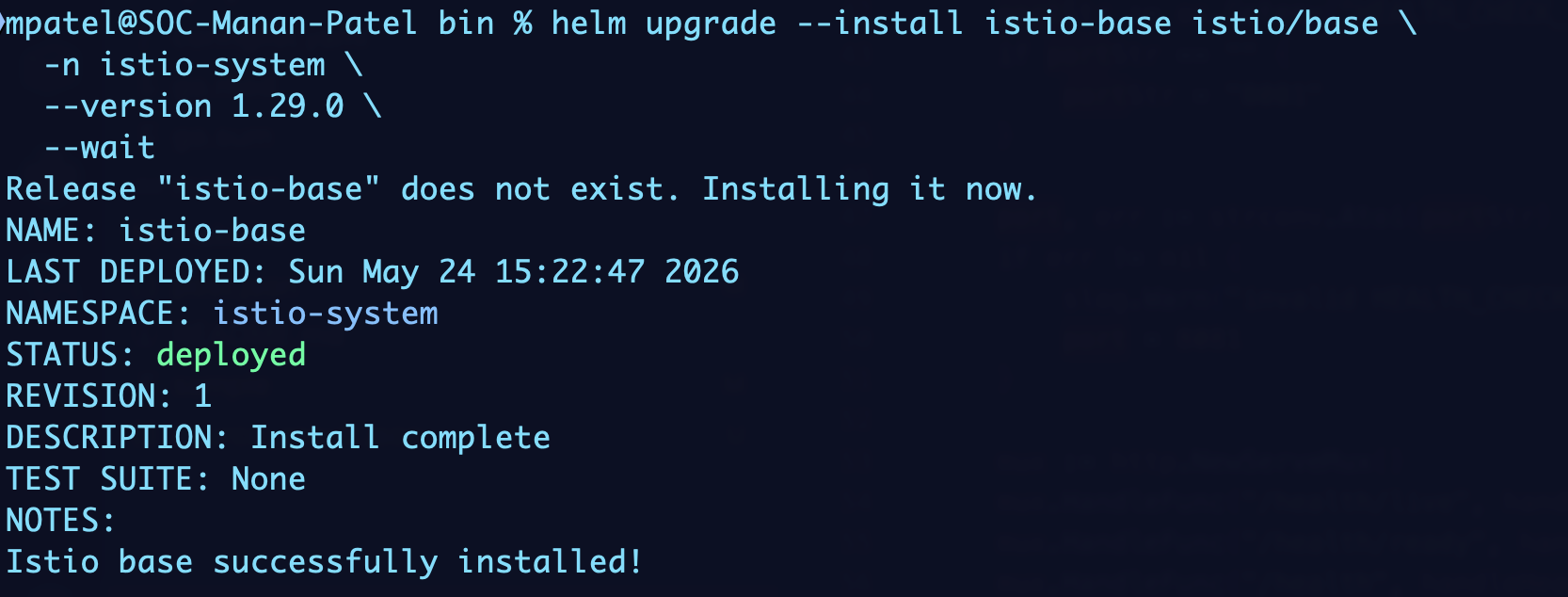
This screenshot does not show custom registry configuration because it was taken in a test cluster, but you should see the global.hub and global.tag values in the output of your installation.
Now, once the base is installed, validate CRDs are installed.
kubectl get crd | grep -i istio
We are looking for CRDs like - gateway, virtualservices, destinationrules, etc.
Step 4: Upgrade the Istio Control Plane (istiod)
We are using an upgrade with --install to ensure it works whether or not Helm currently manages the release. The --set parameters configure the control plane to pull images from your private registry and use the correct version.
helm upgrade --install istiod istio/istiod \ -n istio-system \ --version 1.29.0 \ --set global.hub=YOUR_PRIVATE_REGISTRY_URL/istio \ --set global.tag=1.29.0 \ --set global.imagePullSecrets[0].name=docker-hub-secret \ --set global.proxy.image=proxyv2 \ --wait \ --timeout 10m
Key parameters explained:
--set global.hub=...: Your private registry URL for Istio images.--set global.tag=1.29.0: Image tag (must match what exists in your registry).--set global.imagePullSecrets[0].name=docker-hub-secret: References the secret created earlier.--wait: Helm waits for the deployment to be ready before returning.
Step 5: Upgrade/Install Ingress Gateway
If you're using Istio's ingress gateway for external traffic routing, which is a must in our case to support Blazemeter mock services. Make sure to upgrade it as well to ensure compatibility with the new control plane and to pull images from your private registry.
helm upgrade --install istio-ingressgateway istio/gateway \ -n istio-system \ --version 1.29.0 \ --set global.hub=YOUR_PRIVATE_REGISTRY_URL/istio \ --set global.tag=1.29.0 \ --set service.type=LoadBalancer \ --set imagePullSecrets[0].name=docker-hub-secret \ --wait
For internal load balancers (Blazemeter enterprise networks):
kubectl -n istio-system annotate svc istio-ingressgateway \ service.beta.kubernetes.io/azure-load-balancer-internal=true \ --overwrite
Once all components of the Istio System are installed/upgraded, you can validate the control plane is running the new version:
helm list -n istio-system
See screenshot of the output of the above command showing the new version of istiod and gateway:

Step 6: Restart Workload Deployments
Force pods to restart so they pick up the new sidecar version, considering that you already have existing workloads with sidecars injected by the old version of Istio. This is critical to ensure that all sidecars are running the new version and are compatible with the upgraded control plane.
Restart all deployments in a namespace
kubectl rollout restart deploy -n <your-workload-namespace>
Back to top
Part 5: ROLLBACK — Return to Safety If Needed (Recovery from Failed Upgrade)
If something goes wrong during or after the upgrade, you have multiple rollback options.
Option 1: Helm Rollback (Fastest)
View Helm release history.
helm history istiod -n istio-system
Rollback to the previous release.
helm rollback istiod -n istio-system 1 # Replace '1' with previous revision number
Verify rollback.
kubectl -n istio-system get pods kubectl -n istio-system describe deployment istiod | grep Image
Option 2: Restore from Backup Manifest
If Helm rollback is not sufficient:
Delete current Istio resources:
kubectl delete namespace istio-system
Recreate the namespace.
kubectl create namespace istio-system
Restore from backup.
kubectl apply -f istio-system-backup-YYYYMMDD-HHMMSS.yaml
Verify restoration.
kubectl -n istio-system get pods --watch
Rollback Validation
After a successful rollback, confirm that the control plane is back to the old version and that CRDs and sidecar injection are functioning as expected. Use the following commands to validate:
Confirm you're back on the old version.
kubectl -n istio-system describe deployment istiod | grep Image
Verify CRDs still exist.
kubectl get crd virtualservices.networking.istio.io
Test sidecar injection again.
kubectl delete pod -n default test-pod --ignore-not-found kubectl run test-pod --image=nginx --labels version=v1 -n default kubectl -n default get pods test-pod -o jsonpath='{.spec.containers[*].name}'
Troubleshooting Common Issues
Issue: Image Pull Errors (ImagePullBackOff)
Cause: Pull secret missing or incorrect. This is something you can check with your Cloud/DevOps team who are managing your private registry and the pull secrets in your cluster. I will still lay down some steps to check and validate the pull secret configuration and credentials.
Resolution:
Verify secret exists.
kubectl -n istio-system get secret docker-hub-secret
Test pull secret credentials manually
kubectl -n istio-system create pod test-pull \ --image=YOUR_PRIVATE_REGISTRY_URL/istio/pilot:1.29.0 \ --image-pull-policy=Always \ --overrides='{"spec":{"imagePullSecrets":[{"name":"docker-hub-secret"}]}}' kubectl -n istio-system logs test-pull
You may see this error in the working namespace where the BlazeMeter agent is installed and not in the istio-system namespace. This is because the pull secret is not created in the workload namespace. This can lead you to believe that the pull secret is working correctly when in fact it is not.
Issue: Sidecar Injection Fails (omitNil Error)
Cause: Version mismatch between istiod and sidecar injector template.
Resolution:
Ensure all Istio components use the same version.
helm list -n istio-system helm search repo istio/istiod --version 1.29.0
Upgrade all components to exactly 1.29.0 Re-run the Helm commands from Part 3 with explicit version pins.
Issue: Missing CRDs After Upgrade
Cause: istio/base not installed before istiod.
Resolution:
Install base first.
helm install istio-base istio/base -n istio-system --version 1.29.0
Then install/upgrade istiod.
helm upgrade --install istiod istio/istiod -n istio-system --version 1.29.0 ...
Back to top
Best Practices for Enterprise Deployments
- Test in Staging First
- Never upgrade production directly. Use a staging cluster with identical configuration.
- Run load tests and functional tests in staging for at least 1–2 weeks before production.
- Use Helm for Consistency
- Stick to one installation method (Helm-only or istioctl-only) per cluster.
- Avoid mixing methods, which causes ownership and version conflicts.
- Version Lock All Components
- Keep
istio-base,istiod, andistio-ingressgatewayat exactly the same version. - Version skew is the #1 source of mysterious failures.
- Keep
- Monitor Post-Upgrade
- Watch
istiodlogs for errors in the first 24 hours. - Monitor application sidecar errors and injection failures.
- Set up alerts for
CrashLoopBackOffandImagePullBackOffstates.
- Watch
- Private Registry Maintenance
- Regularly scan private registry images for CVEs.
- Keep only supported versions; delete old tags to reduce storage costs.
- Document which images are mirrored and at which tags for compliance audits.
- Compliance and Audit
- Log all upgrade activities with timestamps and approvals.
- Retain backup manifests for the duration required by your compliance framework.
- Document the pull secret creation and rotation schedule.
Bottom Line
Upgrading Istio from legacy versions to a modern, supported release is a high-impact move for enterprise BlazeMeter customers. By combining a private registry strategy with careful backup, validation, and rollback procedures, you eliminate both security risks and operational uncertainty.
The two paths outlined here, Helm and istioctl, offer flexibility based on your infrastructure choices. Helm is simpler and more suitable for most enterprises; istioctl provides more granular control for advanced scenarios.
Key takeaways:
- Backup first. Your baseline is your insurance policy.
- Use Helm for safety. Helm rollback is powerful and fast.
- Test in staging. Never surprise your production cluster.
- Keep versions aligned. Version skew is a silent killer in service mesh upgrades.
- Monitor after upgrade. The first 24 hours are critical.
For BlazeMeter enterprise customers with questions about your specific environment, compliance framework, or cluster topology, reach out to our customer success team. We're here to ensure your upgrade is smooth, secure, and reliable.
If you are interested in learning more about how BlazeMeter successfully handles sensitive information and potential security risks, request a custom demo today.